If you have been running dslrBooth at weddings, corporate events, birthday parties, and celebrations around the world, this post is for you. Together we have helped capture millions of photos and videos at events across 150+ countries. That history means a lot to us.
Version 8.0 is our biggest Windows release in years, and it comes with a name change that has been a long time coming. Same software. Same stability. A whole new world of features. Welcome to LumaBooth for Windows.
First: About the New Name
dslrBooth has been our Windows photo booth software for over 14 years. It has powered booths at hundreds of thousands of events. It has been trusted by tens of thousands of operators in over 150 countries. It is rock solid, and we are proud of every version we have shipped.
So why rename it?
Because dslrBooth and LumaBooth for iOS/Mac have always been the same family, just with different names. When you set up an event, you should not have to think about which app you are running. When you configure your templates, they should just appear everywhere. Your events, your settings, your templates should all live in one place and work the same way across every device you own.
LumaBooth for Windows makes that possible. One brand. One platform. One dashboard that connects everything.
What is NOT changing
Your license works exactly as it always has. Your events, templates, settings, and data carry over automatically. Every feature you rely on is still here. The software you know and trust is still the software you know and trust. It just has a name that finally matches the rest of the platform.
If you see a new icon or a new name in your start menu, that is the only surprise. Everything else is exactly where you left it, plus a lot of new things you are going to love.
Meet Our Llama
Version 8.0 also introduces someone new. Meet Luma the llama, the official LumaBooth mascot.
Here is something most people don’t know about llamas. They are remarkably hardworking, dependable, and sure-footed. They carry heavy loads over difficult terrain without complaint. They show up, do the job, and never let the team down. That felt right to us.
For 14 years, that is what we have tried to be. You set up your booth. You trust us to handle the rest. We show up, carry the load, and never let you down in front of your clients and guests. The llama is us. And now it has a face.
You will be seeing a lot more of the llama going forward.
The LumaBooth Dashboard: Configure Once, Run Anywhere
Anyone who has run a Windows photo booth knows the drill. You need to make a change to your event setup. That means unpacking your booth, powering up the machine, making the tweak, then packing everything back up. It is tedious, especially when the booth is a full Windows tower or a tablet that is awkward to use without a keyboard.
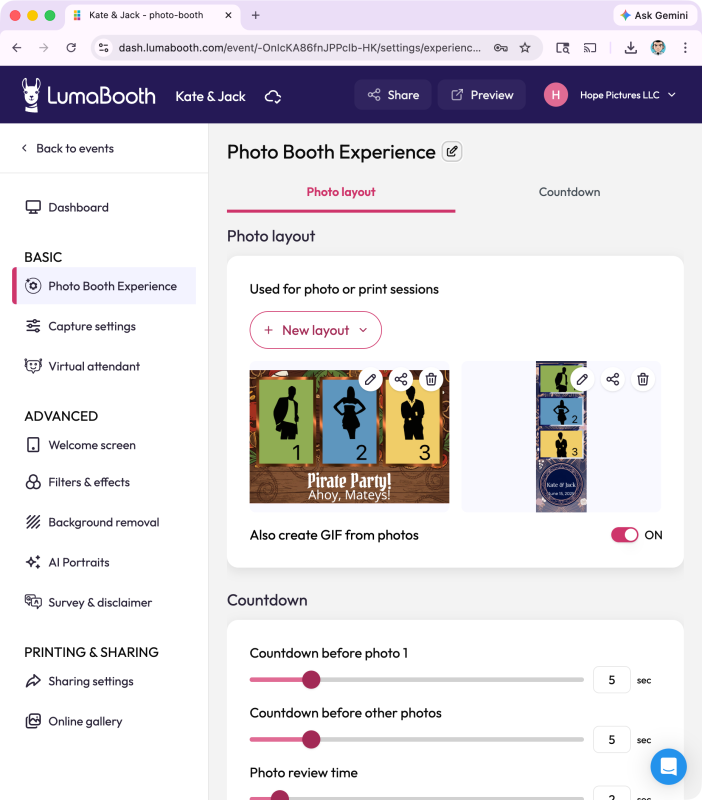
The LumaBooth Dashboard fixes this. Configure your entire event from any browser on any device, your phone, your laptop, a tablet at the kitchen table. Templates, overlays, backgrounds, sharing settings, all of it. Your booth picks it up automatically the next time it connects. No unpacking required.
No more hassle of making changes on a tablet device or hooking up a mouse. Configure everything from your computer browser or phone, and your booth is ready to go.
And here is the part that makes this truly powerful. That same event you configured in your browser is also ready on your iPad, your iPhone, and your Mac. LumaBooth for Windows is now part of the same unified platform as LumaBooth for iOS and Mac. Create once, run on any device.
No other photo booth platform connects Windows and iOS under one roof. This is a first.
820+ Professional Templates: No Designer Required
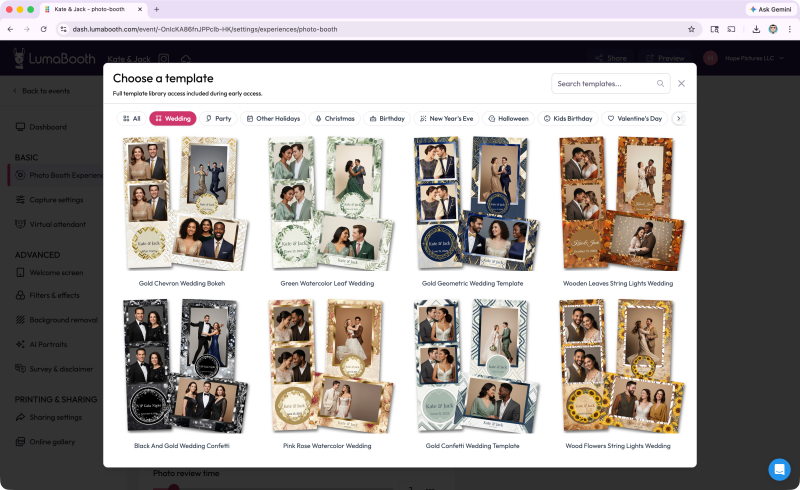
Templates have always been the hidden tax of running a photo booth business. You either hire a designer, buy template packs, pay yet another monthly subscription, or spend hours in Canva trying to make something that looks professional. Most operators do all of the above at some point.
With LumaBooth for Windows 8.0, that problem is solved. Over 820 professionally designed templates are now included with your subscription. Weddings, birthdays, corporate events, holidays, there is something for every occasion and every client brief you will ever receive.
Browse from your browser, star your favorites, and they are ready in your software when you launch your event. A client books you for a corporate gala on Friday. Open your phone Thursday night, browse the library, star a few options that match their brand colors, and you are done. No Photoshop. No Canva. No extra subscription. No wasted time. Just pick and go.
AI Portraits: Pure Wow, One Click
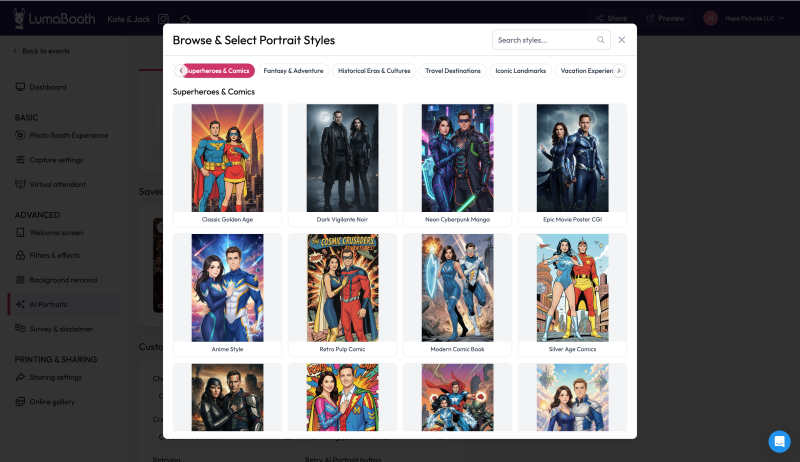
This is the feature your clients are going to talk about for weeks after the event.
AI Portraits transform your guests into superheroes, vintage oil paintings, 3D characters, and more, right from your booth. Over 170 styles to choose from, no green screen required, no complicated setup. One click in the dashboard to enable it for an event, and every guest leaves with something they have never seen before.
For operators, this is a new revenue conversation. You can charge more for an AI Portrait experience than a standard photo booth. Clients book you over the competitor down the street because you offer something they cannot. Nobody else at the event will have seen anything like it.
Faster Performance and a Refreshed Look
Version 8.0 is our fastest, most stable Windows release yet. We have done significant work under the hood to improve performance across the board, with faster event loading and smoother capture and processing.
The interface has also been refreshed to match the new LumaBooth brand. Cleaner, sharper, and more modern, while keeping the familiar layout that experienced operators know by heart. Everything is where you expect it. It just looks a lot better.
What Else Is New
Google Fonts brings thousands of font choices to your welcome screens and photo layouts, no design tools needed. The Portrait Video Virtual Attendant gets new built-in styles so your booth feels polished from the moment guests step up. Contrast-aware guest buttons now automatically adjust text and icon readability against any background color, so your booth always looks sharp regardless of your theme.
Animated overlay files now support up to 50 MB, giving you more room for rich creative designs. GIF, slow-mo, and video output sizes are now standardized for consistent results across every session. Event loading is smoother with progress indicators throughout, and remote update notifications are cleaner and more accurate.
A Note to Our Long-Time Customers
If you have been with us since the early dslrBooth days, thank you. Genuinely. You built your businesses on software we poured ourselves into, and that means everything to us.
This rename is not us walking away from what we built together. It is us doubling down on it. LumaBooth for Windows is dslrBooth, grown up, unified, and more powerful than it has ever been. The 14 years of stability and reliability you depend on is still the foundation. We just built a lot more on top of it.
We have been at this for 14 years because of you. Every event you ran, every booth you set up, every client you impressed with our software — that is what kept us going and kept us building. Version 8.0 is our way of saying we are not done. Not even close.
Same team. Same commitment. Better software. Let’s keep going.
Ready to Update?
LumaBooth for Windows 8.0 is available now. If you are an existing subscriber, just update and everything carries over automatically.
New here? Start your free trial and see what your booth can do.
Download LumaBooth for Windows
LumaBooth, the life of the party!